
Latest updates from the Dubsado team

Originally posted: January 9th, 2019
Originally posted: January 3rd, 2019
On a roll with the workflow updates lately. New today is the action of a workflow triggering another workflow. This allows you to add an action in workflow A to trigger workflow B on that project.

In the workflow template, click ADD ACTION. From there you can add the "Start A Workflow" action and choose the workflow you want to start.

Any questions, feel free to chat or email us!
Few things to note about using workflows and our newly launched feature:
- The new workflow does not add to the job until that action "Start A Workflow" has triggered.
- You cannot apply the same or duplicate workflows to one project. They have to be different workflows.
- When you have multiple workflow template applied, they do not talk to each other. Example, if you send a form in workflow A, you cannot trigger an email to send when form is completed in workflow B.
- If you want to review the additional workflow being applied before it starts sending things, use our newly launched APPROVE BEFORE SENDING feature on the first actions of that additional workflow.
Originally posted: January 2nd, 2019
We added a GREAT workflow addition today!
(insert happy dance) This is an exciting one. Now you can approve actions before they send to your clients. Approving before sending allows you to edit any items in that action before it sends. If all looks well you can approve it. If you don't approve right away, when it comes time for that action to trigger, you will receive an email alert reminding you to approve that action. There will also be a dashboard alert under the RECENT section letting you know which actions still need approval. You need to set it up in order for this to happen. Read below on how to do that!
To set up:
Approve before sending in a workflow is available on the following actions:
- send email
- send form
- send contract
- send primary invoice
- create invoice
- send appointment scheduler
When clicking into these actions, if you'd like to have approve before sending on, check the box!

How to approve actions:
You can approve actions as soon as you apply the workflow, even before it triggers so it can flawlessly send.

OR, if you choose to wait for that action to "trigger" you receive an email and dashboard alert reminder. It will NOT send until approve the action if you have that "approve before sending" on that action.
The dashboard alert:
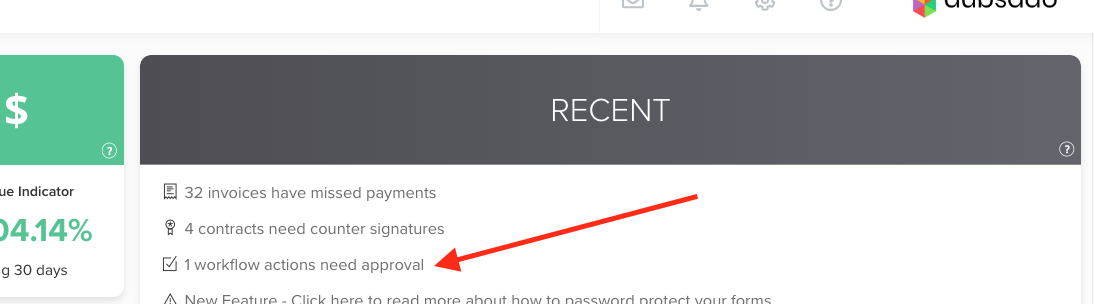
When you click through the dashboard alert, it brings you to a page with all the triggered pending posts.

When that action is triggered for approval, in addition to the dash alert, you get an email:

Super exciting. Let us know if you have any questions! :)
Originally posted: January 1st, 2019
We recently added the ability to map times in addition to the job dates on forms. This is completely separate to the scheduler and just a simple date question you add on the form. My mapping it to the job start or end date, it will have an option for the client to pick a time. It does not block that time out for others (use the scheduler if you want it to do that). So if you just needed a simple way to ask a client for a date and time and have it map, here you are!


If you wish for that date select to not show a time, change the mapping to just JOB DATE...

Originally posted: December 20th, 2018

We have added two workflow updates for you today. One action and one trigger.
We added the new action of archiving a project a certain point, most likely at the very end of a workflow since archiving a project pauses a workflow.
We will be adding conditional logic to more areas in workflows, but we are first starting with forms. With conditional form logic, you can now trigger an action to happen if a form has not been filled out. The form first needs to be added into your workflow in order for you to look at it and watch for it to not be completed. The form MUST be sent/triggered within that workflow to use conditional logic on it.
Originally posted: December 16th, 2018
Originally posted: December 11th, 2018
Two great updates for you today!
Originally posted: December 4th, 2018
You can now customize your auto email templates for the when the client books an appointment with you, when they cancel, and when they reschedule. Reminder: These 3 canned emails are sent automatically and there is nothing that you need to do to send them.
To customize, head to TEMPLATES >> CANNED EMAILS >> EDIT TEMPLATES

Within those canned emails there are the correct smart fields for populating the appointment information.

Originally posted: December 3rd, 2018
Another little update to our Scheduler. We have added smart fields for the Reschedule and Cancel buttons. These are for the use of creating canned emails and adding them in the Scheduler as the reminders. Before the reminders did not have these options...so add them in now if you would like your client to be able to either of these on the reminder emails.

Hope you enjoy this update! :)
Originally posted: December 2nd, 2018
.gif)
With this update, your brand settings color ( SETTINGS >> BRANDING ) will reflect in your scheduler as well.
So, whatever color you choose here:

Will appear here:

Enjoy this little update! :)